Mastering Your AgencyZoom Pipeline: Design, Management & Optimization
If you’ve ever stared at a blank AgencyZoom pipeline setting and thought, "What stages should I actually use?" you aren't alone. In fact, 30% of all questions asked to our Zoomy AI this month were about pipeline configuration.
A well-oiled pipeline is the difference between a lead slipping through the cracks and a bound policy. But getting there manually is painful.
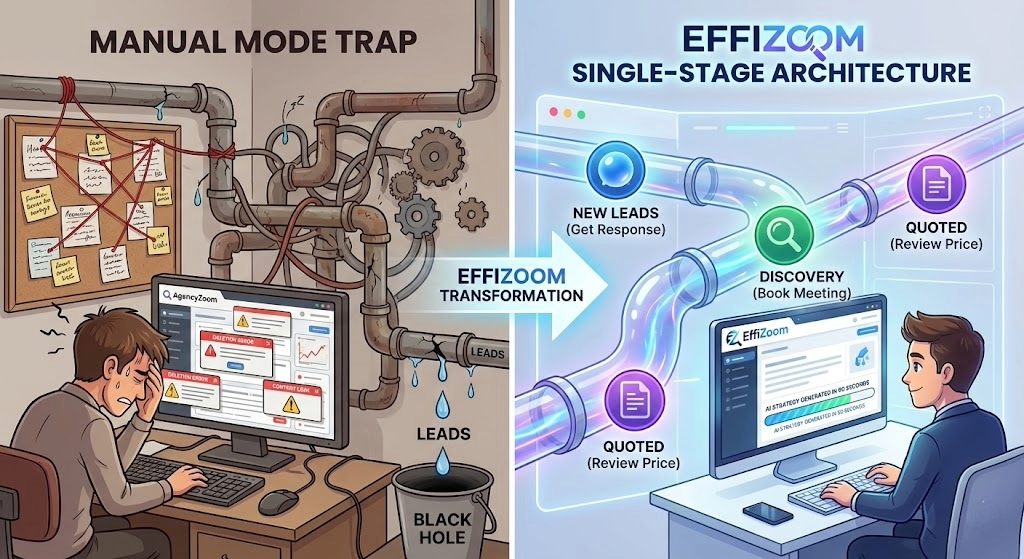
The "Manual Mode" Trap
Most agencies default to a generic setup: New → Contacted → Quoted → Sold. It looks fine on paper, but in practice, it creates three major problems:
The "Black Hole" Stage: Leads sit in "Contacted" for weeks with no follow-up because there’s no urgency.
The Deletion Nightmare: You try to delete a stage you don't use, only to get the dreaded error: "The stage can't be deleted since it is the target stage for automation touchpoints." Now you're stuck hunting down hidden automation rules.
Content Leaks: You accidentally send a "Here is your quote" email to a prospect who hasn't even answered the phone yet because your automation spans too many stages.
The EffiZoom Solution: Single-Stage Architecture
At EffiZoom, we built the Enhanced Architect to stop you from guessing. Instead of dragging and dropping stages manually, our AI generates sophisticated strategies based on one golden rule:
The Single-Stage Principle. Each automation strategy we generate targets ONE pipeline stage only.
New Leads: The goal is only to get a response.
Discovery: The goal is only to book the meeting.
Quoted: The goal is only to review the price.
By isolating your stages, you prevent content from "leaking" (mentioning quotes too early) and you eliminate those "Cannot Delete Stage" errors because dependencies are clean and contained.
3 Best Practices for Pipeline Management
If you are managing your pipelines manually today, start here:
Define "Done" for Every Stage: Don't move a lead to "Quoted" until the quote is actually sent. Ambiguity kills automation.
The "Shot Clock" is Your Safety Net: Set a 2-day Shot Clock on your "New Lead" stage. If a lead isn't touched in 48 hours, it should automatically move to a "Manager Review" stage.
Don't Delete—Archive: If a stage is giving you error messages, it's likely tied to an old automation. Instead of fighting the system, rename it to "Z_Archive" and move it to the bottom until you have time to audit your automation map.
Ready to Stop Building Manually?
EffiZoom’s Enhanced Architect can generate a full, multi-stage pipeline strategy—complete with emails, texts, and task sequences—in under 90 seconds. Stop building. Start closing.If you’ve ever stared at a blank AgencyZoom pipeline setting and thought, "What stages should I actually use?" you aren't alone. In fact, 30% of all questions asked to our Zoomy AI this month were about pipeline configuration. A well-oiled pipeline is the difference between a lead slipping through the cracks and a bound policy. But getting there manually is painful. The "Manual Mode" Trap Most agencies default to a generic setup: New → Contacted → Quoted → Sold. It looks fine on paper, but in practice, it creates three major problems: The "Black Hole" Stage: Leads sit in "Contacted" for weeks with no follow-up because there’s no urgency. The Deletion Nightmare: You try to delete a stage you don't use, only to get the dreaded error: "The stage can't be deleted since it is the target stage for automation touchpoints." Now you're stuck hunting down hidden automation rules. Content Leaks: You accidentally send a "Here is your quote" email to a prospect who hasn't even answered the phone yet because your automation spans too many stages. The EffiZoom Solution: Single-Stage Architecture At EffiZoom, we built the Enhanced Architect to stop you from guessing. Instead of dragging and dropping stages manually, our AI generates sophisticated strategies based on one golden rule: The Single-Stage Principle. Each automation strategy we generate targets ONE pipeline stage only. New Leads: The goal is only to get a response. Discovery: The goal is only to book the meeting. Quoted: The goal is only to review the price. By isolating your stages, you prevent content from "leaking" (mentioning quotes too early) and you eliminate those "Cannot Delete Stage" errors because dependencies are clean and contained. 3 Best Practices for Pipeline Management If you are managing your pipelines manually today, start here: Define "Done" for Every Stage: Don't move a lead to "Quoted" until the quote is actually sent. Ambiguity kills automation. The "Shot Clock" is Your Safety Net: Set a 2-day Shot Clock on your "New Lead" stage. If a lead isn't touched in 48 hours, it should automatically move to a "Manager Review" stage. Don't Delete—Archive: If a stage is giving you error messages, it's likely tied to an old automation. Instead of fighting the system, rename it to "Z_Archive" and move it to the bottom until you have time to audit your automation map. Ready to Stop Building Manually? EffiZoom’s Enhanced Architect can generate a full, multi-stage pipeline strategy—complete with emails, texts, and task sequences—in under 90 seconds. Stop building. Start closing.